Portfolio

Suria

How I organized the complexity of Brazilian broadcasting data into a clear interface for public lookup.

Client Ministry of Communications
Product Public broadcasting lookup
Role UX Designer / UI Designer
Year 2025
Format Remote project (Microsoft Teams)
Foundation Brazilian Federal Government Design System
View case
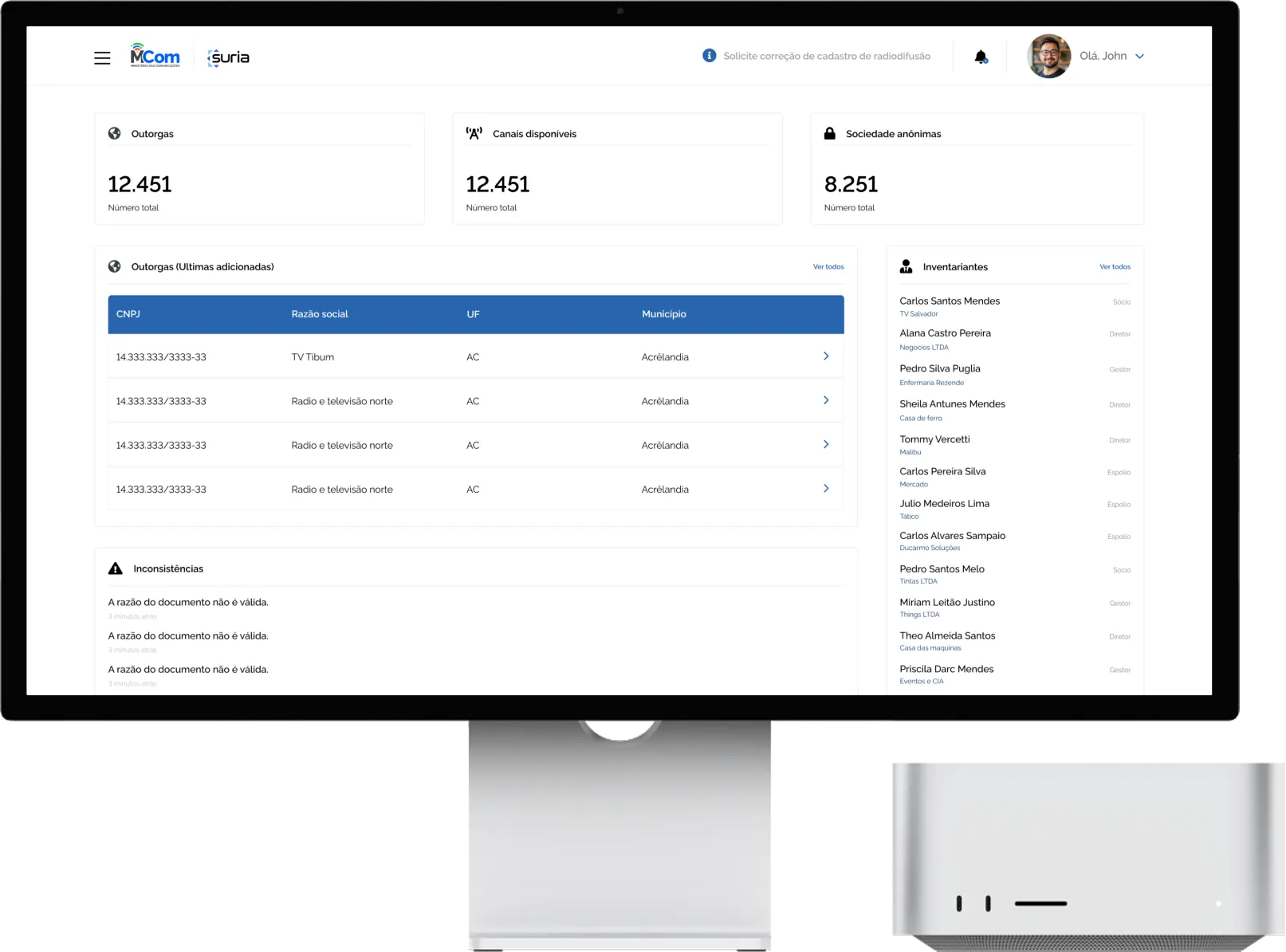
Suria dashboard on a monitor: indicators, latest licenses and inconsistencies

I organized the complexity of Brazilian broadcasting data into a clear interface in Suria, officially launched by the Ministry of Communications.

(1) Challenge

Structuring the experience from an initial flow and client requirements, without full discovery, in a system with a large volume of data.

(2) My role

UX/UI Designer: information architecture, navigation and flows, interfaces and components.

(3) Solution

Clear visual hierarchy, standardized components and data visualization (maps and tables), built on the Federal Government Design System.

(4) Result

System officially launched by the Ministry of Communications. An estimated 40% less analysis time.

Context and challenge

The project was run remotely, with check-ins over Microsoft Teams, based on an initial flow and requirements provided by the client. Without full discovery, I drew on my previous experience with similar systems to ensure clarity, organization and usability.

The challenge was to turn an already defined flow into an intuitive experience, structuring navigation and features consistently to reduce complexity and make everyday use easier.

The previous system: a dense structure, lots of information at once and little visual hierarchy, which made navigation and finding the main actions harder. Click to enlarge.

My role and process

I worked as UX/UI Designer, structuring the experience and building the interfaces. The focus was turning an initial flow into a clear, consistent and functional experience.

Information architecture Organizing the data
Main navigation and flows Fewer steps to action
Interfaces and components Creation and standardization
Adapting to requirements Based on what the client provided

Process

(1)
Understanding the context

Analysis of the requirements and the broadcasting domain, based on materials and similar systems.

(2)
Structuring the problem

Organizing the information and defining requirements from the initial flow.

(3)
Information architecture

Mapping flows and organizing data for clearer navigation.

(4)
Design System

Adapting GOV.BR patterns for consistency and accessibility.

(5)
Prototyping

High-fidelity cycles to validate the usability of maps and dense tables.

(6)
Iterative refinements

Refinement based on feedback and an evolving understanding of the system.

Design decisions

(1)
Organizing navigation

Easy access to the main features, with fewer steps.

(2)
Information hierarchy

Highlighting what matters most, to make reading easier.

(3)
Component standardization

A consistent visual standard across screens, for more predictability.

(4)
Simplifying flows

Flows adjusted to reduce complexity and make interactions direct.

Suria screens: dashboard, listings, license detail and corporation. Click to enlarge.

Data as a tool

Design often tries to hide data to simplify. Here, the data is the tool itself: the interface accommodates charts, coverage maps and dense tables with complete clarity, without losing technical depth.

A solid foundation: the Federal Government Design System

I used the Federal Government Design System as the foundation so Suria would feel familiar and accessible. My mission was to adapt the library to the Ministry's extreme data visualization needs, ensuring visual consistency and technical compliance while keeping the design focus on flow and usability.

Federal Government Design System components adapted to Suria. Click to enlarge.

Where data meets territory

One of Suria's pillars is geographic visualization: spatial context for regulatory decisions. The coverage heatmap is a living data layer. To keep performance up with complex signal propagation polygons, I used progressive loading and smart filters, so users can switch between a national view and the detail of a single antenna in seconds. Zooming in reveals new levels of technical metadata.

License detail: coverage heatmap and antenna radiation pattern. Click to enlarge.

Ownership traceability and transparency

In broadcasting, understanding “who's who” behind a license is critical. I designed an entity management module that untangles dense ownership structures: a table that supports hundreds of shareholders without losing readability, with tax and legal compliance indicators right in the listing.

The visual hierarchy highlights each partner's ownership percentage and legal status. Analysts spot compliance risks in seconds, in a centralized flow that used to be a manual lookup across several databases.

Entity registration and ownership table with filters, percentages and each partner's status. Click to enlarge.
Result and impact

Designing for the Federal Government is an exercise in humility: success isn't measured in clicks, but in the interface becoming invisible, when the analyst forgets they're dealing with a monumental database.

40% estimated reduction in analysis time, by centralizing flows that used to be scattered.
Launched officially by the Ministry of Communications, as part of modernizing public systems, and announced on official government channels.

The platform centralizes information on licenses and enables detailed lookups, contributing to more transparency and public access to Brazilian broadcasting data.

What made the difference

Honest data Complexity revealed gradually
Decisions with context Maps and tables as living tools
Sustainable growth A Design System any team can maintain

What I learned

This project reinforced the importance of adapting design solutions to different working contexts, especially with less client proximity and no full discovery. It also showed the value of drawing on previous experience to make sharper decisions, ensuring quality delivery even under constraints.